Requests and follow-ups
An inquiry arrives by email, someone enters it in a spreadsheet, and a follow-up depends on a reminder. We look at how those handoffs could be connected.
REDIGO / AI & Practical Automation
From copying information between systems to chasing follow-ups and updating spreadsheets, small tasks can take up a surprising amount of time. We help businesses find better ways to handle that work using the tools they already have.
EVERYDAY ADMINISTRATION
A customer conversation or a difficult decision deserves a person's time. Copying the same inquiry into three places usually doesn't.
An inquiry arrives by email, someone enters it in a spreadsheet, and a follow-up depends on a reminder. We look at how those handoffs could be connected.
A meeting ends with useful notes but no assigned tasks. Staff search emails and documents for answers they've found before. We look at where the information should go and who needs it.
Someone gathers figures from several tools every week or copies changes between records. A reliable connection may remove those steps without needing AI.
AI-ASSISTED EVENT RESEARCH
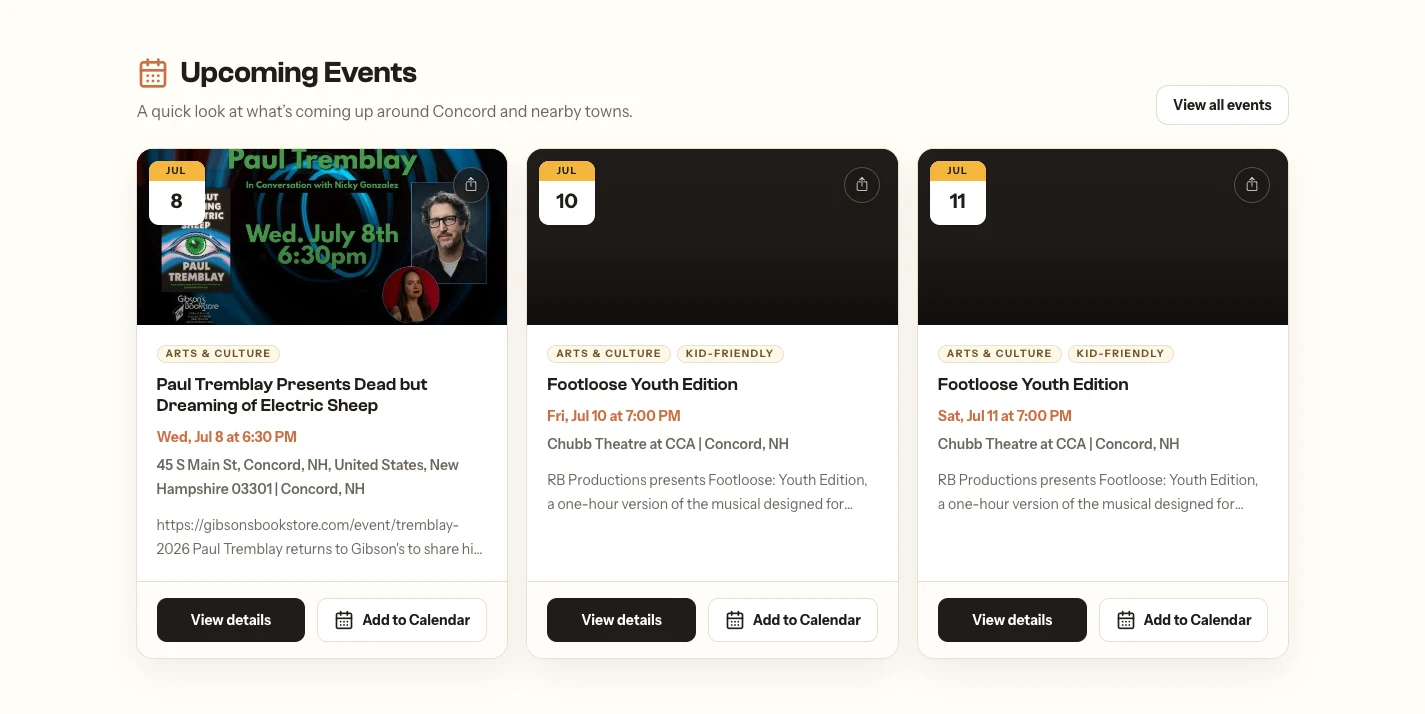
Cap City Buzz uses an AI-assisted workflow to find local events, organize the details, and help identify what's worth featuring. Instead of researching every event manually, the publishing process starts with a more useful collection of information ready for review.
The research and import workflow gathers event information from relevant local sources, including dates, venues, source links, and draft newsletter blurbs. Those details enter a review queue so the publisher can check the information and decide what belongs in the newsletter.
The newsletter builder brings selected, approved events into an issue draft. This connects research, review, and preparation, reducing repeated copying and organizing while keeping editorial choices with the publisher. It does not publish researched events automatically.
Public event listings. The research and review workflow happens behind the scenes.
Independently developed and operated Redigo product.
Read the case study for Cap City BuzzWORKFLOWS / KNOWLEDGE / TOOLS
These are examples of the work we can build. We start with your current process and tools, then choose the parts that make sense for your business.
Help your team respond without copying the same details into several places.
Connect the small jobs that otherwise depend on someone remembering.
Make useful information easier to find without expecting people to memorize every document.
Work with the systems you have and build around the gaps between them.
OUR APPROACH TO AI
Your team brings experience, judgment, and relationships that software can't take over. We look for ways to reduce repeated administration so they have more time for customers, colleagues, and growing the business.
We work with your existing systems whenever practical. Sometimes the answer is an integration or a small custom tool. When AI is useful, we agree what information it can access, where a person reviews the work, and how it will be tested and maintained.
For larger internal tools, see our custom applications service. For forms and customer journeys, see website strategy and development.
FROM THE FIRST WALKTHROUGH
Walk through the current process, who takes part, and the tools they use. Start with a real example.
Look for repeated entry, unnecessary handoffs, and places where existing tools could work together.
Build the agreed workflow, try normal and difficult cases, and review the results with your team.
Document the workflow, agree who reviews exceptions, and decide what ongoing support it will need.
THE WORK YOU RECEIVE
A small integration needs different work from a document-based assistant. We'll agree which deliverables your project needs, the information and access required, and who will manage it afterward.
BEFORE WE CONNECT ANYTHING
Often, no. We start by looking at your existing tools and the connections they support. If a limitation prevents the workflow you want, we'll explain the options before suggesting a different tool.
No. Moving a form submission into a CRM or setting a follow-up reminder may need only a straightforward integration. AI can help with tasks such as summarizing notes or answering questions from documents, but it adds its own testing and review needs.
We can review them and check what's possible. It depends on the software, account permissions, available integrations, and provider limits. We confirm those details before committing to a connection.
We first agree what information the workflow needs, who should have access, and which services would process it. We review storage, permissions, and provider settings for the project. Information your business cannot share may need to stay out of the workflow.
Yes, review points can be part of the design. For example, a system can prepare a reply for approval or flag an incomplete record instead of updating it automatically. We decide which actions can run on their own and which need a person.
Yes. A single recurring task is often a useful place to start. We can work through it, test the result, and decide whether further changes are worth making.
Changes to your software, business rules, or source documents can affect the workflow. We'll agree who maintains it, how problems are reported, and whether you want ongoing monitoring and support.
A RECURRING TASK
Tell us about a process you'd like to improve. We'll help determine whether automation, AI, or a simpler change makes sense.