Your software should fit the way your business works.Build a better fit with custom applications.
When spreadsheets and disconnected tools become difficult to manage, another subscription may not solve the problem. We review your existing options, define a useful scope, and build custom applications around the people who will use them.
The software should fit your business. Not the other way around.
Off-the-shelf software is often the right choice. But you may be paying for dozens of features your employees never use, while subscription costs grow with each user, add-on, or additional tool.
The functionality you do need may still be missing. Employees fill the gaps with spreadsheets and workarounds, change established processes to accommodate software limitations, or move the same information between disconnected platforms just to complete a straightforward job.
DEVELOPED WORK / WEBSITE PREVIEW
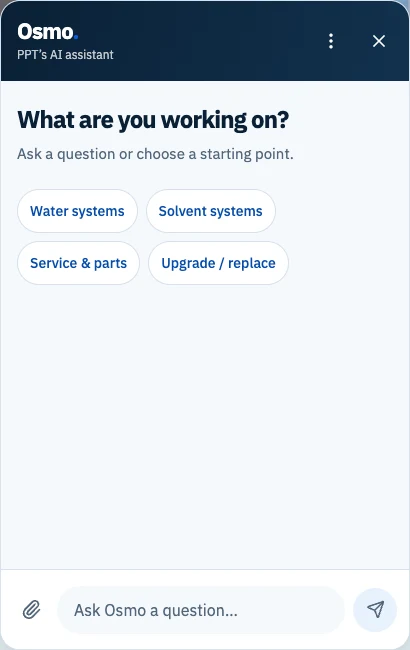
Osmo for Pure Process Technology.
Osmo welcome interface. The broader website integration is shown in PPT's V2 preview.
A purpose-built application for specialized product assistance.
Pure Process Technology needs product assistance grounded in specialized water and solvent system information. Redigo built Osmo as a custom application with an AI-powered visitor interface, document-based answers, and administrative tools for managing the knowledge behind them.
The chatbot is integrated into the website, alongside product and service navigation. A visitor can describe an application or ask a question using the information they have, without needing to know a product name first.
An application staff can manage, with controls around its use.
Behind the chat interface, we built administrative tools so PPT can review conversations, see where answers need attention, and improve the knowledge available to the chatbot.
Review chats and unanswered questions
Staff can inspect conversations, work through flagged questions, and resolve items after review.
Manage documents and improve answers
The dashboard supports document uploads, product information, and approved answers. Staff can add or update knowledge to address gaps found in conversations.
Control access and published knowledge
Admin access is restricted to authorized accounts. Customer-facing sources are kept separate from the internal library, with approval controls for the knowledge made available to visitors.
Safeguards and usage controls
The implementation includes limits on requests, message size, and AI usage, along with rules for unsupported answers and technical questions that need PPT review. These controls are part of the developed application; production configuration and release remain separate steps.
Developed for PPT and shown with the V2 website preview. This is not presented as a confirmed public application launch.
Redigo builds focused applications around the work your business needs to do. We define the functionality people will actually use, giving you more control over features, integrations, the user experience, and future improvements. These are examples of what your application could include.
Internal business tools
Give the office and the people doing the work a shared place to manage the details.
01Job and project management
Keep job details, progress, and responsibilities together so people can see what needs attention.
02Scheduling and assignments
Plan appointments and assign work to the right person, with schedules that can be checked from the office or on site.
03Internal dashboards
Bring the information people need into one view, such as open jobs, outstanding requests, or records awaiting review.
04Document and record management
Attach documents, photos, and notes to the relevant customer or job, with access based on who needs them.
05Administrative workflows
Build the steps for reviewing a request, approving work, or updating a record around how your business operates.
Customer-facing applications
Help customers submit information, use a service, or manage their relationship with your business.
01Client and customer portals
Give customers a place to view project information, share documents, or check the status of a request.
02Custom request and intake systems
Collect the details your team needs, whether that means a service request, an application, or a quote with supporting files.
03Interactive tools and calculators
Help visitors explore options or estimate requirements using calculations and guidance agreed for your business.
04Account dashboards
Let customers review the account information and actions relevant to them, with permissions planned from the start.
05Publishing and membership platforms
Build the reader experience alongside content management, subscriptions, and member access where the project needs them.
Connected systems
Keep useful existing software in place and connect it where the platforms allow.
01CRM and email integrations
Pass inquiry details into your CRM or connect subscriptions to email delivery without repeatedly entering the same information.
02Payment processing
Connect an established payment provider to purchases or subscriptions, including the account updates that need to follow a payment.
03Database integrations
Read or update records across agreed systems, with clear rules for which source owns each piece of information.
04Reporting and analytics
Bring selected operational data into useful reports, such as job status or request volume, with agreed definitions and access.
05Workflows between platforms
Connect steps such as receiving a request, creating a job, and notifying the person responsible. We check provider access, costs, and limitations before scoping the work.
CHOOSING THE RIGHT APPROACH
Not every problem needs custom software.
Review what is already available first.
We review existing platforms, their capabilities and costs, and the way your people work before recommending development. Configuring a platform you already use or connecting two systems may be enough.
Custom software is not always the right financial choice. A purpose-built application makes sense when better support for the workflow, greater control, or other practical benefits justify the initial investment and ongoing maintenance. We consider those costs alongside the available alternatives, rather than assuming a custom build will be cheaper.
A SCOPE THAT FITS THE PROJECT
What you receive.
From the workflow to working software.
The exact scope depends on the project. We agree which of these components you need, what your business will provide, and how the application will be managed after handoff.
01Workflow and requirements review
A shared understanding of the tasks, users, information, and priorities the application needs to support.
02Application design and prototypes
Key screens and user journeys to review before committing to the full build.
03Custom development
The agreed application features, built around the tasks and access rules defined together.
04Integrations and data management
The scoped system connections, record structures, and any agreed data imports or migration.
05Testing and deployment
Checks of key tasks, permissions, integrations, accessibility, and device layouts, followed by the agreed release setup.
06Documentation and handoff
Guidance for using and managing the application, with hosting, access, and upkeep responsibilities made clear.
07Optional maintenance and improvements
An agreed support arrangement for updates, maintenance, and further development as needs change.
BEFORE WE BUILD
Questions about custom applications.
How do we know if we need custom software?+
Start with the task that is difficult today. We review how it works, what your existing software can do, and whether configuration or an integration would be enough. A custom build needs a useful advantage that justifies its cost and upkeep.
Is custom software more expensive than a subscription?+
It can be, especially at the start. Custom development has an upfront cost, followed by hosting, maintenance, and any third-party service fees. Subscription costs can also grow with users, add-ons, and extra tools. We compare the capabilities and ongoing costs of existing platforms with the cost of building and maintaining an application. Custom software is worth considering when the benefits justify that investment, not simply because a subscription feels expensive.
Can you connect tools we already use?+
Often, yes. It depends on the access and integration options each platform provides. We check those options, provider costs, and data requirements before recommending a connection.
Can we start with a smaller version?+
Yes. We can define a first version around one important workflow, with the roles and connections it needs. Later features can be considered after people have tried the core application.
Will the application work on phones and tablets?+
We plan the application around the devices people will use and test the agreed workflows at those sizes. Camera uploads, offline use, and other device-specific needs should be discussed early because they can change the scope.
Who owns the application and its data?+
We agree ownership, source-code access, and data access before work begins. Third-party services and software may have their own licenses and terms. We also discuss where records live, how they can be exported, and who manages the accounts.
What happens after launch?+
We agree who handles hosting, updates, backups, and support before release. Redigo can provide ongoing maintenance and improvements under a separate arrangement, or prepare a handoff for whoever will manage the application.
Can you improve an application we already have?+
We can review its code, hosting, documentation, and current limitations. The next step may be a focused improvement, a new integration, or a rebuild if the existing application cannot reasonably support what you need.
YOUR NEXT STEP
Have a tool in mind?
Start with what you need the software to do.
Tell us what you're trying to build or what isn't working with your current software. We'll help you figure out whether a custom application makes sense.